Intro to Segments

What Are Segments?

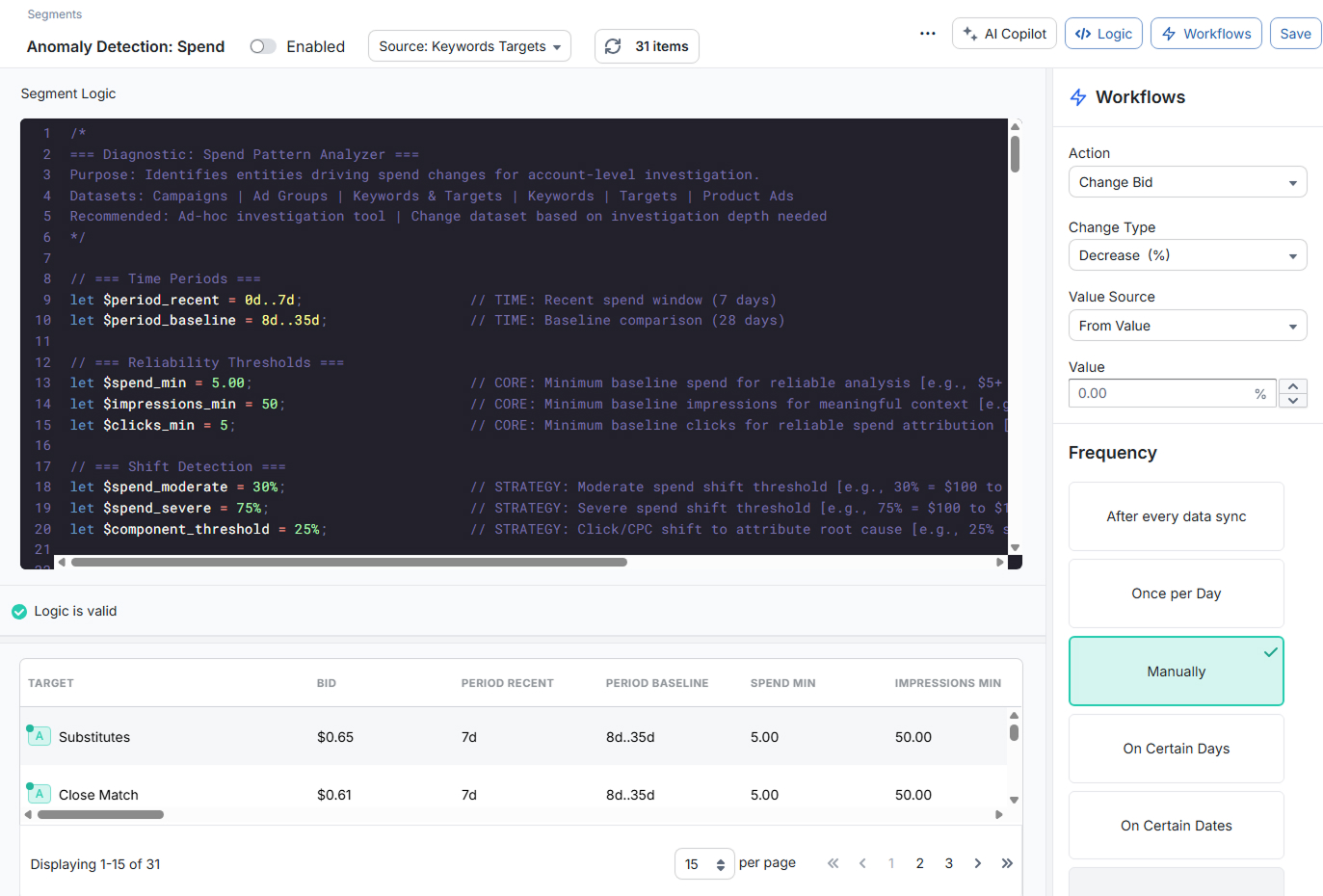
Segments are saved, filterable views of your Amazon Ads data. Each Segment is built from three main pieces:

  1. Source dataset: The level of data you want to work with (Campaigns, Ad Groups, Keywords & Targets, Search Terms, etc.).
  2. Segment Logic (V2 Logic): The expression that filters items and defines any helper variables.
  3. Workflows (optional): The automated actions and schedule you want to apply to the items in the Segment.

At a basic level, a Segment answers a question like:

"Show me all items that meet these conditions, using this dataset, over this date range."

Once you save a Segment, you can:

  • Reopen it at any time to refresh the results
  • Sort and inspect the matching items in the results table
  • Attach one or more Workflows to automate actions on those items

Segments are the main way to explore data and build ongoing automations in Merch Jar.

V2 Logic: The Segments Expression Language

Segment Logic uses V2 Logic, a query-style expression language built specifically for Segments. With V2 Logic you can:

  • Filter items by metrics and properties (for example, clicks(30d) > 20 and acos(30d) > target_acos)
  • Create reusable variables with let (for example, let __target_bid_new = rpc(30d) * target_acos)
  • Combine conditions with and, or, and parentheses for more complex logic

V2 Logic always runs against the Source dataset you select in the Segment toolbar. The metrics and properties available in the editor change depending on that dataset.

V2 Logic is only used inside Segments. It does not affect existing Recipes or any V1 Logic you may already be using.

How Segments Relate to Recipes

Originally, what is now called V2 Logic was introduced as part of the Recipes feature. We’ve since separated the two:

  • Recipes (V1 Logic):
    • Use the original Recipes syntax (V1 Logic).
    • Are focused on predefined automation templates and rules.
    • Continue to work exactly as before.
  • Segments (V2 Logic):
    • Use the newer expression language (V2 Logic) described in this doc.
    • Are designed for flexible filtering, analysis, and custom automation.
    • Are managed from the Segments interface, with their own Workflows.

Today, Recipes and Segments are independent systems:

  • Changing a Segment does not change any existing Recipe.
  • Editing or running a Recipe does not affect any Segments.
  • V1 Logic is used only in Recipes; V2 Logic is used only in Segments.

You can safely use both side-by-side while you transition more of your workflow to Segments.

When to Use Segments vs. Recipes

Use Segments when you want:

  • Flexible, expression-based filtering of your data using V2 Logic
  • Saved views you can revisit, refine, and attach Workflows to
  • More advanced conditions, comparisons, and helper variables

Use Recipes when you want:

  • Existing V1 Logic templates you already rely on
  • Simpler, pre-built automations you don’t want to rebuild yet

Over time, most new analysis and automation will be built around Segments and V2 Logic. Recipes remain available for existing workflows and for users who prefer the V1 Logic system.

Getting Started

To create your first Segment:

  1. Navigate to Segments in the sidebar and click the Create Segment button
  2. Choose a Source dataset in the Segments toolbar (for example, Keywords & Targets).
  3. Write Segment Logic using V2 Logic to define which items should be included.
  4. Refresh the results to confirm the Segment is selecting the right items.
  5. (Optional) Add a Workflow to automate actions based on this Segment.

Once saved, you can reuse and refine the Segment as often as you like—updating the logic, adjusting Workflows, or simply using it as a powerful saved report.

PREVIOUS ARTICLE
NEXT ARTICLE